1 session for each client SMPP connection
SMPP · SMS · SMSC sandbox
SMPP sandbox for SMS developers
A hosted SMPP simulator and SMSC sandbox you can point your code at. Build and test SMPP clients, SMS gateways and OTP flows against a safe sandbox - no real handsets, no delivery costs, and full control over delivery reports.
- TX · RX · TRX binds
- Unicode & multipart SMS
- Scriptable delivery reports
$ connect smpp://SIMULATOR_IP:4444
> bind_transceiver  system_id=my_client
< bind_transceiver_resp  ESME_ROK
> submit_sm  to=15551234567  "Your code is 4821"
< submit_sm_resp  ESME_ROK  message_id=20550305
  ... delay set by your scheme ...
< deliver_sm  esm_class=0x04  stat:DELIVRD
SMPP v3.4plus REST API & HTTP API
TX / RX / TRXall bind types
Scripted DLRsdelay & status mix per client
3 days freeto test everything
About
What is Maxi SMPP Sandbox? An SMSC / SMPP simulator for developers
Maxi is a hosted SMPP simulator and SMSC sandbox that exists only to be tested against. Your code connects over SMPP v3.4, REST API or HTTP API exactly as it would to a real SMS provider, but messages never reach a mobile network. You can develop, debug and automate SMS features without the cost, risk or waiting time of real delivery.
You decide what the sandbox answers. Give each client account a delivery scheme - how many seconds to wait and what share of messages become Delivered, Not Delivered, Expired, Pending or Rejected - and your application receives the matching delivery reports. The same message flow can be replayed as often as you need, which makes SMS behaviour testable.
Protocol & limits
SMPP sandbox specifications
Single SMPP port for input connections - 4444
Transceiver (TRX), Transmitter (TX) and Receiver (RX) connection to the simulator
MT (A2P) simulation
Bandwidth up to 100 SMS/sec
SMPP v3.4, REST API and connection API
Use cases
Built for the way developers test SMS
From the first bind to a green CI run, the sandbox covers the SMS scenarios that are slow, costly or impossible to repeat against a real provider.
Build an SMPP client
Develop against TX, RX and TRX binds, submit_sm and deliver_sm without a provider contract or a test number.
Test OTP & 2FA flows
Send a code, receive the delivery report and verify what your app does when the SMS is delivered, delayed or never arrives.
Simulate failures
Set the share of Not Delivered, Expired, Pending and Rejected reports per client, and watch your retry and fallback logic run.
Run integration tests in CI
One client account per pipeline or environment, a fixed delivery scheme and no real SMS: results you can repeat on every commit.
Check long & Unicode SMS
Validate concatenation, UCS2 and GSM 7-bit handling before a customer sees a garbled or truncated message.
Load-test your SMS platform
Push volume through plans of up to 500 SMS/sec and see how your queues, windows and throttling behave under pressure.
Coverage
What you can test in the sandbox
- Sending messages via Transmitter (TX)
- Receiving delivery reports via Receiver (RX)
- Sending messages and receiving delivery reports via Transceiver (TRX)
- A positive submit_sm_resp with a message_id for every accepted message
- Delivery receipts (deliver_sm) arriving on RX and TRX sessions
- Multipart (concatenated) SMS
- Unicode (UCS2) and GSM 7-bit (Latin1) character sets
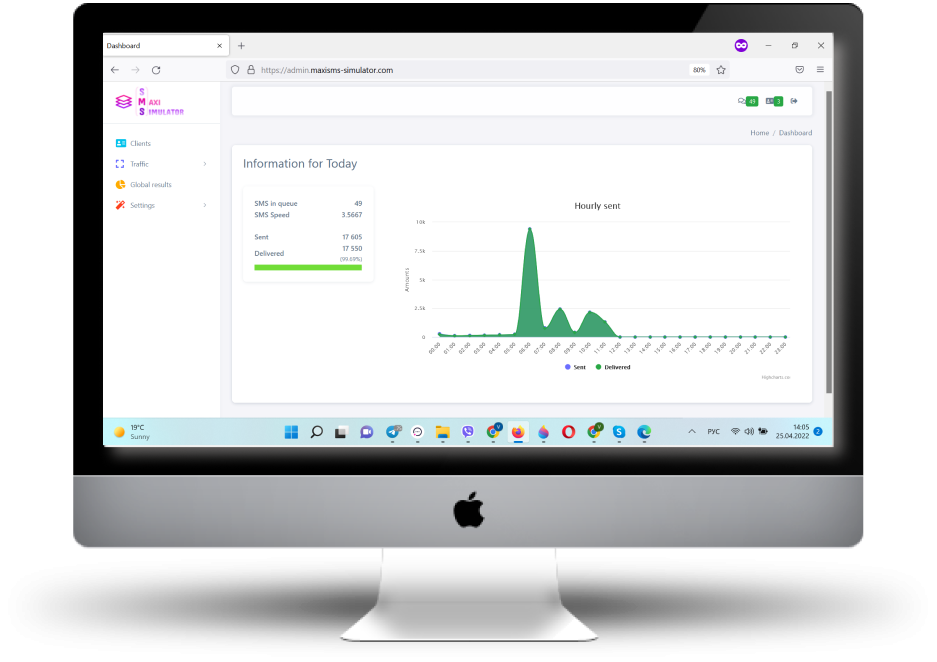
Sandbox web panel
Everything you need to run the sandbox, in one panel
Register, create a client account and point your code at the sandbox. The web panel gives you live visibility into what your application sent and what the sandbox answered.
Create and manage client accounts with SMPP credentials and allowed IPs
Define delivery schemes: delay and the share of each delivery status
Watch the live SMS queue as your application submits messages
Watch and manage the live queue of delivery reports
Analyse statistics for every message processed by the sandbox
Upgrade or pay for a plan online when you need more clients or speed
For developers
Connect your client in minutes
Create a client account in the panel, add SMPP credentials and your IP, then point your SMPP library at the sandbox. Use the host and port shown in the top bar of your panel (SMPP port 4444).
- Bind as transmitter, receiver or transceiver
- Get a
message_idin everysubmit_sm_resp - Receive delivery receipts as
deliver_smafter the delay you configure
const smpp = require('smpp');

const url = 'smpp://SIMULATOR_IP:4444';
const auth = { system_id: 'your_login', password: 'your_password' };

const session = smpp.connect({ url }, () => {
  session.bind_transceiver(auth, (pdu) => {
    if (pdu.command_status !== 0) return console.error('Bind failed');

    session.submit_sm({
      destination_addr: '15551234567',
      short_message: 'Your code is 4821',
      registered_delivery: 1,
    }, (resp) => console.log('message_id:', resp.message_id));
  });
});

// delivery receipt
session.on('deliver_sm', (pdu) => {
  console.log(pdu.short_message.message);
  session.send(pdu.response());
});
import smpplib.client, smpplib.consts, smpplib.gsm
client = smpplib.client.Client('SIMULATOR_IP', 4444)
client.set_message_received_handler(lambda pdu: print('DLR:', pdu.short_message))
client.connect()
client.bind_transceiver(system_id='your_login', password='your_password')
parts, encoding, msg_type = smpplib.gsm.make_parts('Your code is 4821')
for part in parts:
client.send_message(
source_addr_ton=smpplib.consts.SMPP_TON_INTL,
source_addr='MyApp',
dest_addr_ton=smpplib.consts.SMPP_TON_INTL,
destination_addr='15551234567',
short_message=part,
data_coding=encoding,
esm_class=msg_type,
registered_delivery=True,
)
client.listen()require 'vendor/autoload.php'; // composer require onlinecity/php-smpp
use smpp\SmppClient;
use smpp\SmppAddress;
use smpp\SMPP;
use smpp\transport\SocketTransport;
$transport = new SocketTransport(['SIMULATOR_IP'], 4444);
$transport->setRecvTimeout(10000);
$smpp = new SmppClient($transport);
$transport->open();
$smpp->bindTransceiver('your_login', 'your_password');
$from = new SmppAddress('MyApp', SMPP::TON_ALPHANUMERIC);
$to = new SmppAddress(15551234567, SMPP::TON_INTERNATIONAL, SMPP::NPI_E164);
$messageId = $smpp->sendSMS($from, $to, 'Your code is 4821', null, SMPP::REG_DELIVERY_SMSC_BOTH);
echo "message_id: $messageId\n";
$smpp->close();package main
import (
"fmt"
"time"
"github.com/linxGnu/gosmpp"
"github.com/linxGnu/gosmpp/data"
"github.com/linxGnu/gosmpp/pdu"
)
func main() {
auth := gosmpp.Auth{
SMSC: "SIMULATOR_IP:4444",
SystemID: "your_login",
Password: "your_password",
}
session, err := gosmpp.NewSession(
gosmpp.TRXConnector(gosmpp.NonTLSDialer, auth),
gosmpp.Settings{
ReadTimeout: 2 * time.Second,
OnPDU: func(p pdu.PDU, _ bool) {
switch v := p.(type) {
case *pdu.SubmitSMResp:
fmt.Println("message_id:", v.MessageID)
case *pdu.DeliverSM:
fmt.Println("DLR:", v.Message.String())
}
},
}, 5*time.Second)
if err != nil {
panic(err)
}
defer session.Close()
sm := pdu.NewSubmitSM().(*pdu.SubmitSM)
sm.SourceAddr, _ = pdu.NewAddressWithAddr("MyApp")
sm.DestAddr, _ = pdu.NewAddressWithAddr("15551234567")
sm.Message, _ = pdu.NewShortMessageWithEncoding("Your code is 4821", data.GSM7BIT)
sm.RegisteredDelivery = data.SM_SMSC_RECEIPT_REQUESTED
if err := session.Transceiver().Submit(sm); err != nil {
panic(err)
}
time.Sleep(10 * time.Second) // wait for the delivery receipt
}// implementation "org.jsmpp:jsmpp:3.0.0"
import org.jsmpp.bean.*;
import org.jsmpp.session.*;
SMPPSession session = new SMPPSession();
session.connectAndBind("SIMULATOR_IP", 4444, new BindParameter(
BindType.BIND_TRX, "your_login", "your_password", "cp",
TypeOfNumber.UNKNOWN, NumberingPlanIndicator.UNKNOWN, null));
// delivery receipt
session.setMessageReceiverListener(new MessageReceiverListener() {
public void onAcceptDeliverSm(DeliverSm deliverSm) {
System.out.println("DLR: " + new String(deliverSm.getShortMessage()));
}
public void onAcceptAlertNotification(AlertNotification n) {}
public DataSmResult onAcceptDataSm(DataSm d, Session s) { return null; }
});
String messageId = session.submitShortMessage("CMT",
TypeOfNumber.ALPHANUMERIC, NumberingPlanIndicator.UNKNOWN, "MyApp",
TypeOfNumber.INTERNATIONAL, NumberingPlanIndicator.ISDN, "15551234567",
new ESMClass(), (byte) 0, (byte) 1, null, null,
new RegisteredDelivery(SMSCDeliveryReceipt.SUCCESS_FAILURE),
(byte) 0, new GeneralDataCoding(Alphabet.ALPHA_DEFAULT), (byte) 0,
"Your code is 4821".getBytes());
System.out.println("message_id: " + messageId);// dotnet add package Inetlab.SMPP
using Inetlab.SMPP;
using Inetlab.SMPP.Common;
using var client = new SmppClient();
client.evDeliverSm += (sender, pdu) =>
Console.WriteLine("DLR: " + pdu.GetMessageText(client.EncodingMapper));
await client.ConnectAsync("SIMULATOR_IP", 4444);
await client.BindAsync("your_login", "your_password");
var responses = await client.SubmitAsync(
SMS.ForSubmit()
.From("MyApp")
.To("15551234567")
.Text("Your code is 4821")
.DeliveryReceipt());
Console.WriteLine("message_id: " + responses[0].MessageId);
await Task.Delay(TimeSpan.FromSeconds(10)); // wait for the delivery receiptWhy developers use it
Why developers use Maxi
Every integration style
Connect with SMPP v3.4, REST API or HTTP API, so the same sandbox serves your SMPP client library, your gateway and your web apps
Nothing to install
The sandbox is hosted, so a teammate or a CI job needs only a host, a port and credentials to start sending
Predictable delivery reports
A delivery scheme per client lets you reproduce delivered, failed and delayed messages on demand instead of waiting for them to happen
Pricing
Free to start, pay when you scale
Start with 3 days of full access at no cost, then pick the plan that matches your team size and message volume
Light
40€
- Clients: up to 3
- Speed: 20 SMS/sec
- SMPP v3.4, REST API and API connections
- Traffic distribution scheme mechanism
- Traffic statistics
Medium
100€
- Clients: up to 10
- Speed: 100 SMS/sec
- SMPP v3.4, REST API and API connections
- Traffic distribution scheme mechanism
- Traffic statistics
Super
150€
- Clients: 10 and more
- Speed: 500 SMS/sec
- SMPP v3.4, REST API and API connections
- Traffic distribution scheme mechanism
- Traffic statistics
Need more clients, higher speed or a team setup? Contact us for a custom setup. Payment is by cryptocurrency - see how to pay.
FAQ
Frequently asked questions
What is an SMPP / SMS sandbox?
A sandbox is a safe copy of the service your code normally talks to. Maxi behaves like an SMSC: your application binds over SMPP, submits messages and receives responses and delivery reports, but nothing is delivered to a real phone. You can build and test SMS features without cost or side effects.
Who is it for?
Developers and QA engineers building SMPP clients, SMS gateways and aggregators, or application features that send SMS such as OTP, 2FA and notifications - plus teams that need to load-test their SMS platform.
Are the messages delivered to real phones?
No. Messages stay inside the sandbox, so there are no delivery costs and no risk of texting real people. The sandbox generates delivery reports and sends them back to your application using the scheme you configured.
Which connection types are supported?
SMPP v3.4, REST API and HTTP API. For SMPP there is a single port for incoming connections, 4444, and each client SMPP connection gets its own session.
Which SMPP bind types can I use?
Transmitter (TX), Receiver (RX) and Transceiver (TRX). Messages are submitted via TX or TRX, and delivery reports arrive via RX or TRX.
How do I test failed or delayed deliveries?
Create a delivery scheme for the client account. Set the delay in seconds before the report is sent and the percentage of reports for each status such as Delivered, Not Delivered, Expired, Pending or Rejected - for example 90% Delivered and 10% Not Delivered. Your retry and error handling then run against real SMPP traffic.
Can I use it in CI pipelines?
Yes. Create a dedicated client account for a pipeline or environment, give it a scheme with the outcome your test expects, and connect your test code to the sandbox host and port with that account's credentials. Because delivery behaviour is configured and not random, results are repeatable.
Does it support long and Unicode messages?
Yes. Multipart SMS and both Unicode (UCS2) and GSM 7-bit character sets are supported, so you can test concatenation and encoding logic.
Is there a free trial?
Yes. After you register you get 3 free days of full access to test all the functionality.
What plans are available?
Light: up to 3 clients at 20 SMS/sec. Medium: up to 10 clients at 100 SMS/sec. Super: 10 and more clients at 500 SMS/sec. All plans include SMPP v3.4, REST API and HTTP API connections, delivery schemes and traffic statistics.
How does payment work?
After the trial you choose a plan in the panel and pay online in cryptocurrency. You have 15 minutes to complete the payment, and it is confirmed within about 2 hours. If you change the plan later, you can only move to a more functional one.
How do I get started?
Register through the link on the site, create a client account, add SMPP credentials and the connecting IP, set up a delivery scheme and point your SMPP library at the sandbox. For questions use the contact form or write to support@maxisms-simulator.com.
Contact
Contact us
Questions about the sandbox, a plan or a custom setup? Write to us. Tell us what you are building and we will suggest the right setup.
- sales@maxisms-simulator.com
- We answer by e-mail